Keycloak Authorization (authz-keycloak)
Description#
The authz-keycloak Plugin integrates APISIX with Keycloak Authorization Services. It sends the caller's bearer token and requested permissions to Keycloak's User-Managed Access (UMA) token endpoint. Keycloak evaluates its resources, scopes, policies, and permissions before APISIX proxies the request.
Permissions can be selected dynamically or configured explicitly. With dynamic path loading, APISIX uses a Keycloak service account to resolve the request URI through the Protection API. With static permissions, APISIX sends the configured resource and scope names directly to the UMA token endpoint.
Attributes#
| Name | Type | Required | Default | Valid values | Description |
|---|---|---|---|---|---|
| max_req_body_size | integer | False | 67108864 | >= 1 | Maximum request body size in bytes buffered into memory when the Plugin generates a password-grant token. If the body exceeds the limit or cannot be read, the Plugin returns 503 Service Unavailable. |
| discovery | string | False | https://host.domain/realms/foo/.well-known/uma2-configuration | URL to the Keycloak UMA discovery document. At least one of discovery and token_endpoint is required. | |
| token_endpoint | string | False | https://host.domain/realms/foo/protocol/openid-connect/token | Token endpoint that supports the urn:ietf:params:oauth:grant-type:uma-ticket grant type for permission evaluation. If provided, it overrides the value from the discovery document. At least one of discovery and token_endpoint is required. | |
| resource_registration_endpoint | string | False | https://host.domain/realms/foo/authz/protection/resource_set | UMA resource registration endpoint. With lazy_load_paths enabled, the Plugin uses this value first and otherwise obtains it from discovery. Dynamic loading requires discovery, or both the token and resource registration endpoints. | |
| client_id | string | True | Client ID of the Keycloak resource server. | ||
| client_secret | string | False | Client secret used when the Plugin authenticates to the token endpoint. This field is encrypted before storage in etcd when field encryption is enabled. | ||
| grant_type | string | False | "urn:ietf:params:oauth:grant-type:uma-ticket" | ["urn:ietf:params:oauth:grant-type:uma-ticket"] | UMA ticket grant used for permission evaluation. This is the only accepted value. |
| policy_enforcement_mode | string | False | "ENFORCING" | ["ENFORCING", "PERMISSIVE"] | Controls how an empty permission list is handled before the Plugin requests a decision from Keycloak. |
| permissions | array[string] | False | Permissions to evaluate when lazy_load_paths is false. Supported forms are RESOURCE_ID#SCOPE_ID, RESOURCE_ID, and #SCOPE_ID. | ||
| lazy_load_paths | boolean | False | false | When set to true, resolves the request URI to Keycloak resources through the resource registration endpoint. | |
| http_method_as_scope | boolean | False | false | When set to true, maps the HTTP request type to scope of the same name and adds to all requested permissions. | |
| timeout | integer | False | 3000 | [1000, ...] | Timeout in ms for the HTTP connection with the Identity Server. |
| access_token_expires_in | integer | False | 300 | [1, ...] | Expiration time(s) of the access token. |
| access_token_expires_leeway | integer | False | 0 | [0, ...] | Expiration leeway(s) for access_token renewal. When set, the token will be renewed access_token_expires_leeway seconds before expiration. This avoids errors in cases where the access_token just expires when reaching the OAuth Resource Server. |
| refresh_token_expires_in | integer | False | 3600 | [1, ...] | The expiration time(s) of the refresh token. |
| refresh_token_expires_leeway | integer | False | 0 | [0, ...] | Expiration leeway(s) for refresh_token renewal. When set, the token will be renewed refresh_token_expires_leeway seconds before expiration. This avoids errors in cases where the refresh_token just expires when reaching the OAuth Resource Server. |
| ssl_verify | boolean | False | true | When set to true, verifies if TLS certificate matches hostname. | |
| cache_ttl_seconds | integer | False | 86400 (equivalent to 24h) | positive integer >= 1 | Maximum time in seconds up to which the Plugin caches discovery documents and tokens used by the Plugin to authenticate to Keycloak. |
| keepalive | boolean | False | true | When set to true, enables HTTP keep-alive to keep connections open after use. Set to true if you are expecting a lot of requests to Keycloak. | |
| keepalive_timeout | integer | False | 60000 | positive integer >= 1000 | Idle time in milliseconds after which an established HTTP connection is closed. |
| keepalive_pool | integer | False | 5 | positive integer >= 1 | Maximum number of connections in the connection pool. |
| access_denied_redirect_uri | string | False | [1, 2048] | URI used for a 307 Temporary Redirect when the permission list is empty in ENFORCING mode or Keycloak returns 403 Forbidden. | |
| password_grant_token_generation_incoming_uri | string | False | /api/token | Legacy compatibility endpoint for the Resource Owner Password Credentials grant. OAuth 2.0 Security Best Current Practice states that this grant must not be used. Do not configure it for new deployments. |
NOTE: The schema marks client_secret as an encrypted field. When field encryption is enabled, APISIX encrypts the value before storing it in etcd. See encrypted storage fields.
Discovery and Endpoints#
Use discovery to let the authz-keycloak Plugin obtain the Keycloak token and resource registration endpoints from the UMA discovery document.
If set, the token_endpoint and resource_registration_endpoint will override the values obtained from the discovery document.
At least one of discovery and token_endpoint is required. Dynamic path loading additionally requires discovery, or both token_endpoint and resource_registration_endpoint.
Client ID and Secret#
The client_id identifies the Keycloak resource server in which permissions are evaluated.
When lazy_load_paths is true, the Plugin obtains a service-account token before querying the Protection API. Configure client_secret for this request and ensure the service-account token contains the uma_protection role.
Policy Enforcement Mode#
The policy_enforcement_mode attribute controls how the Plugin handles an empty permission list before requesting a decision from Keycloak.
ENFORCING Mode#
An empty permission list returns 403 Forbidden, or 307 Temporary Redirect when access_denied_redirect_uri is configured. ENFORCING is the default mode.
PERMISSIVE Mode#
The Plugin continues to the UMA token request without a permission parameter. Keycloak still determines whether the request is authorized.
Permissions#
When handling incoming requests, the Plugin can determine the permissions to check with Keycloak statically or dynamically from the properties of the request.
If the lazy_load_paths attribute is set to false, the permissions are taken from the permissions attribute. Each entry in permissions needs to be formatted as expected by the token endpoint's permission parameter. See Obtaining Permissions.
A permission can contain a resource, a resource and scope, or a scope. Supported forms are RESOURCE_ID, RESOURCE_ID#SCOPE_ID, and #SCOPE_ID.
If the lazy_load_paths attribute is set to true, the request URI is resolved to one or more resources configured in Keycloak using the resource registration endpoint. The resolved resources are used as the permissions to check.
Dynamic loading requires the Plugin to obtain a service-account token. Enable service accounts for the Keycloak client and ensure the issued token contains the uma_protection role before using the Protection API.
The Plugin forwards a request only when Keycloak grants every permission to check, including every scope listed in each permission. If any permission or scope is not granted, the request is rejected.
Automatically Mapping HTTP Method to Scope#
The http_method_as_scope is often used together with lazy_load_paths but can also be used with a static permission list.
If the http_method_as_scope attribute is set to true, the Plugin maps the request's HTTP method to the scope with the same name. The scope is then added to every permission to check.
If the lazy_load_paths attribute is set to false, the Plugin adds the mapped scope to any of the static permissions configured in the permissions attribute—even if they contain one or more scopes already.
Legacy Password Grant Compatibility#
The password_grant_token_generation_incoming_uri attribute is retained for compatibility with existing configurations. When a form-encoded POST containing username and password matches this URI, the Plugin submits a password-grant request to the configured token_endpoint and returns its response.
OAuth 2.0 Security Best Current Practice states that the Resource Owner Password Credentials grant must not be used. Do not configure this attribute for new deployments. See RFC 9700, section 2.4.
Examples#
The following setup creates a Keycloak resource server and demonstrates dynamic and static UMA permission checks.
Before proceeding:
- Install Docker.
- Install cURL and jq.
- Follow the Getting Started tutorial to start APISIX with Docker.
- If you plan to use ADC, install and configure ADC before continuing.
- If you plan to use the Ingress Controller examples, set up the Ingress Controller and gateway in the
aicnamespace.
Configure Keycloak#
Start Keycloak, then configure a protected resource, authorization policy, and scope-based permission.
The walkthrough uses a Keycloak service account to obtain test access tokens. A client-scope policy permits tokens that include httpbin-access to access the protected resource with the access authorization scope.
Start Keycloak#
Choose the environment that matches the APISIX deployment.
- Docker
- Kubernetes
If apisix-keycloak is already running from another guide, connect it to the APISIX quickstart network and skip the next command:
docker network connect apisix-quickstart-net apisix-keycloak
Otherwise, start Keycloak in development mode with the Admin Console bound to the loopback interface:
docker run -d --name apisix-keycloak \
  --network apisix-quickstart-net \
  -e 'KC_BOOTSTRAP_ADMIN_USERNAME=quickstart-admin' \
  -e 'KC_BOOTSTRAP_ADMIN_PASSWORD=quickstart-admin-pass' \
  -p 127.0.0.1:8080:8080 \
  quay.io/keycloak/keycloak:26.7.3 start-dev
Save the Keycloak address:
export KEYCLOAK_URL=http://apisix-keycloak:8080
Create the namespace if it does not already exist:
kubectl create namespace aic --dry-run=client -o yaml | kubectl apply -f -
Create keycloak.yaml with a Keycloak Deployment and Service:
apiVersion: apps/v1
kind: Deployment
metadata:
  namespace: aic
  name: keycloak
spec:
  replicas: 1
  selector:
    matchLabels:
      app: keycloak
  template:
    metadata:
      labels:
        app: keycloak
    spec:
      containers:
        - name: keycloak
          image: quay.io/keycloak/keycloak:26.7.3
          args:
            - start-dev
          env:
            - name: KC_BOOTSTRAP_ADMIN_USERNAME
              value: quickstart-admin
            - name: KC_BOOTSTRAP_ADMIN_PASSWORD
              value: quickstart-admin-pass
          ports:
            - containerPort: 8080
---
apiVersion: v1
kind: Service
metadata:
  namespace: aic
  name: keycloak
spec:
  selector:
    app: keycloak
  ports:
    - port: 8080
      targetPort: 8080
Apply the manifest and wait for Keycloak to become available:
kubectl apply -f keycloak.yaml
kubectl rollout status -n aic deployment/keycloak
Save the in-cluster Keycloak address:
export KEYCLOAK_URL=http://keycloak.aic.svc.cluster.local:8080
In a separate terminal, forward the Keycloak port so that the Admin Console is available locally:
kubectl port-forward -n aic service/keycloak 8080:8080
Development mode and the example administrator credentials are intended only for local testing. For a production deployment, use HTTPS, a production database, and a permanent administrator account.
Open http://localhost:8080/admin/ and sign in with the administrator username quickstart-admin and password quickstart-admin-pass.
Create a Realm and Resource Server#
Create a realm for the authorization resources:
- Select Manage realms → Create realm.
- Enter
authz-realmas the realm name. - Select Create.
Register a confidential OIDC client as the protected resource server:
- Select Clients → Create client.
- Keep Client type set to OpenID Connect, enter
apisix-authzas the client ID, and select Next. - Turn on Client authentication and Authorization. Leave the interactive authentication flows off and select Save.
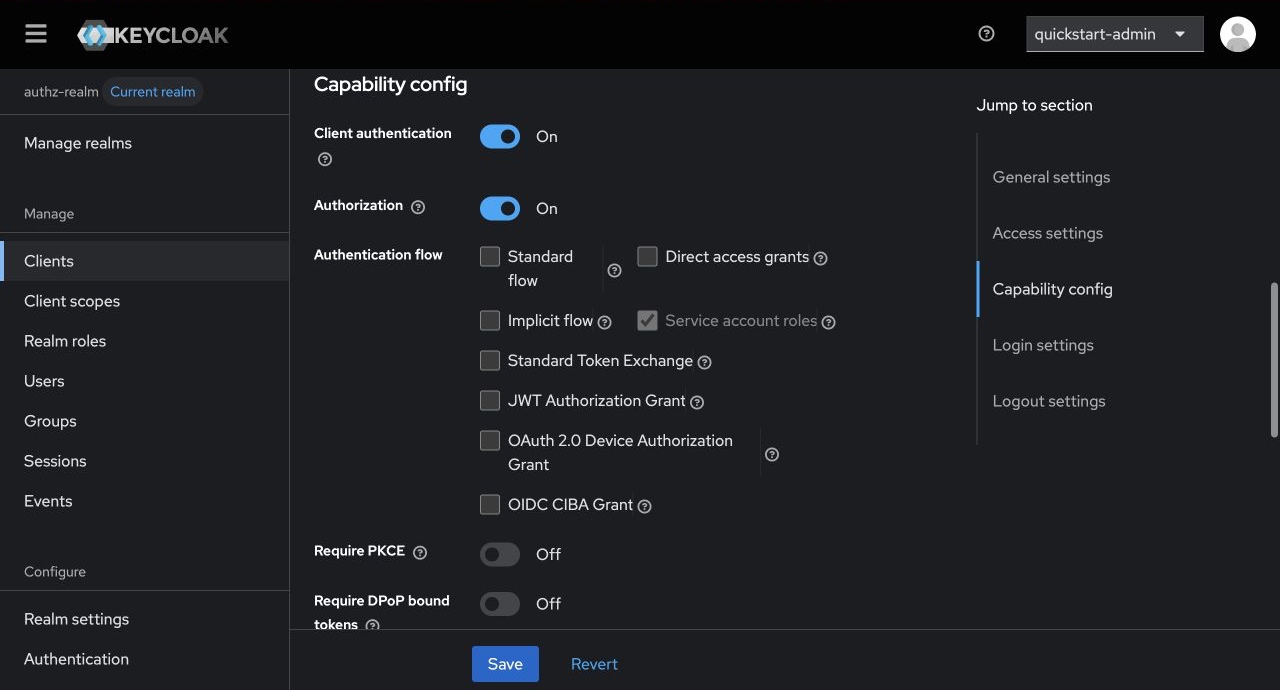
Enabling Authorization also enables the client service account and assigns its uma_protection role. APISIX uses that service account to query the Protection API when dynamic path loading is enabled.
Create and Assign a Client Scope#
Create the client scope required by the authorization policy:
- Select Client scopes → Create client scope.
- Enter
httpbin-accessas the name and keep Protocol set to OpenID Connect. - Turn on Include in token scope and select Save.
- Open Clients → apisix-authz → Client scopes and select Add client scope.
- Select
httpbin-access, select Add, and add it as an optional client scope.
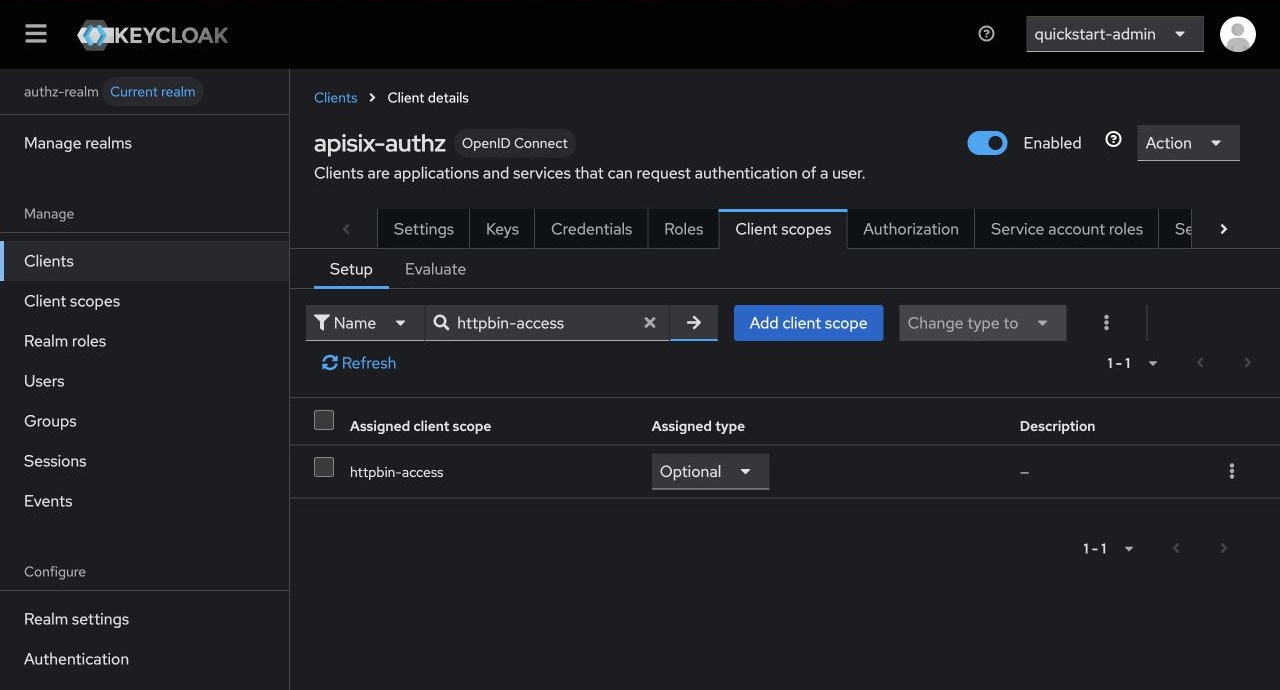
The token request later includes scope=httpbin-access. Keeping the scope optional also makes the denied-request example reproducible without changing the Keycloak configuration.
Create the Authorization Objects#
Open Clients → apisix-authz → Authorization and create the scope and protected resource:
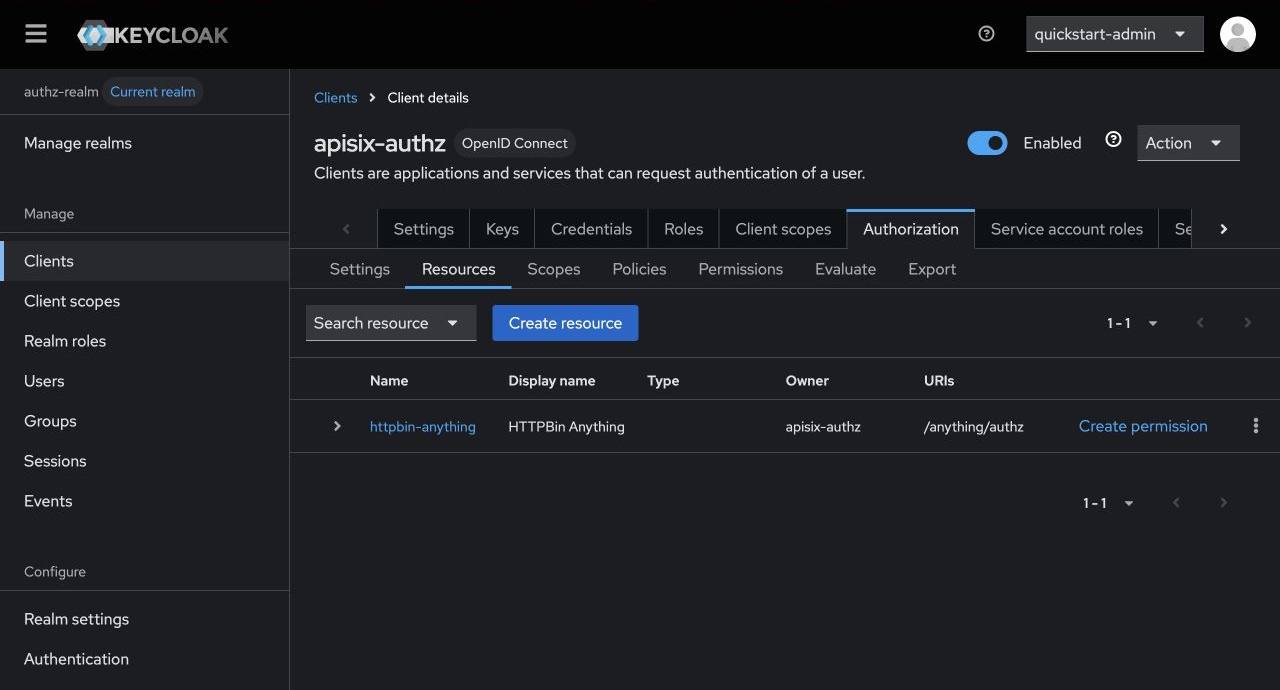
Open Scopes, select Create authorization scope, enter
access, and select Save.Open Resources, select Create resource, and configure these values:
Field Value Name httpbin-anythingDisplay name HTTPBin AnythingURIs /anything/authzAuthorization scopes accessSelect Save.
Create the policy that requires the client scope:
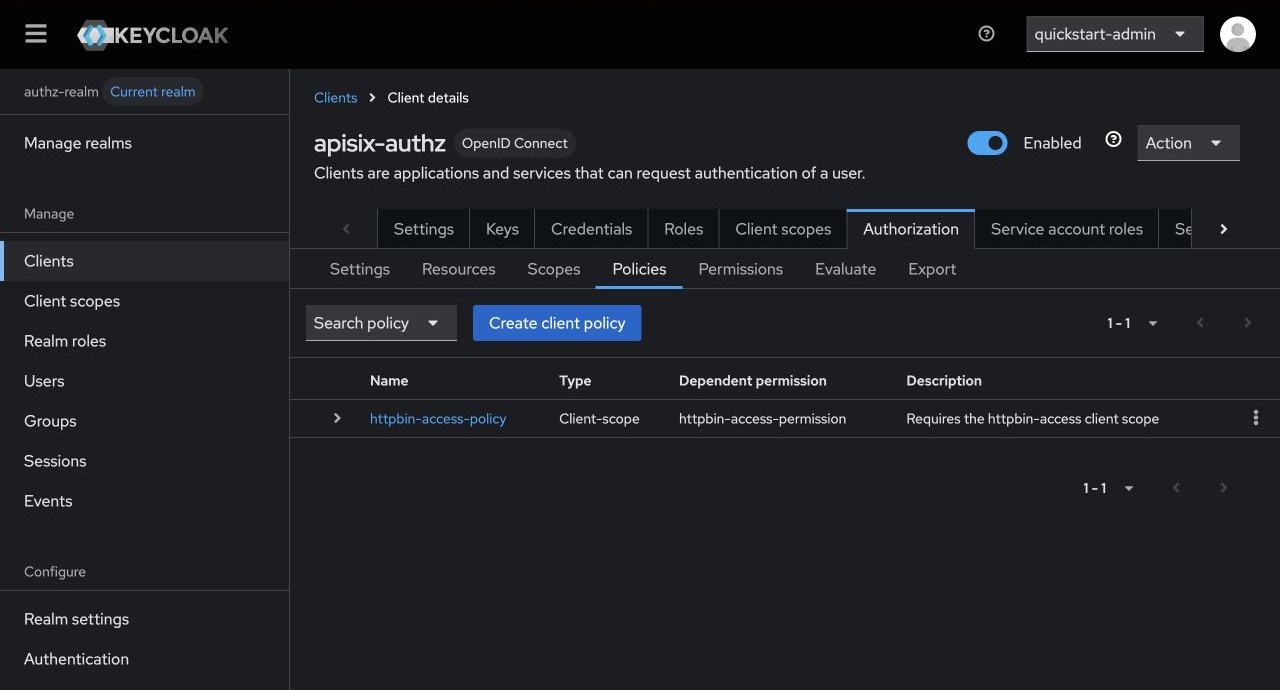
- Open Policies and select Create client policy → Client scope.
- Enter
httpbin-access-policyas the name. - Select
httpbin-accessas the client scope and mark it as required. - Select Save.
Connect the resource and authorization scope to the policy:
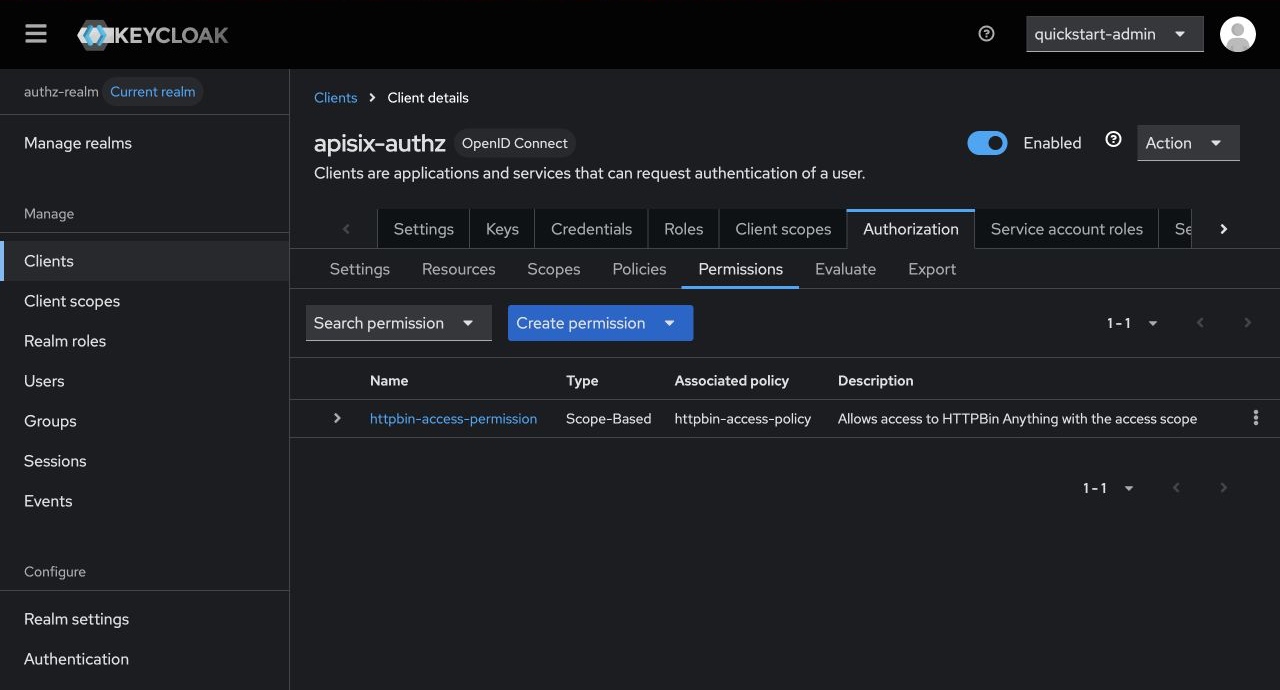
- Open Permissions and select Create permission → Scope-based.
- Enter
httpbin-access-permissionas the name. - Select
httpbin-anythingas the resource,accessas the authorization scope, andhttpbin-access-policyas the policy. - Select Save.
Save the Client Credentials#
Open Clients → apisix-authz → Credentials and copy the client secret. Save the client ID and secret as environment variables:
export KEYCLOAK_CLIENT_ID=apisix-authz
export KEYCLOAK_CLIENT_SECRET=replace-with-your-client-secret
Keep the client secret confidential. Store production credentials in a secret manager and rotate them according to the organization's credential-rotation policy.
Request an Access Token#
Request a service-account token with the optional client scope. Run the command for the environment selected earlier.
- Docker
- Kubernetes
Run the token request from a temporary container on the quickstart network:
export ACCESS_TOKEN="$(
  docker run --rm --network apisix-quickstart-net \
    curlimages/curl:8.22.0 -sS \
    "${KEYCLOAK_URL}/realms/authz-realm/protocol/openid-connect/token" \
    --user "${KEYCLOAK_CLIENT_ID}:${KEYCLOAK_CLIENT_SECRET}" \
    -H "Content-Type: application/x-www-form-urlencoded" \
    --data-urlencode "grant_type=client_credentials" \
    --data-urlencode "scope=httpbin-access" | \
  jq -er '.access_token'
)"
Run the token request from a temporary pod in the aic namespace:
export ACCESS_TOKEN="$(
  kubectl run authz-token-request --rm -i --restart=Never --quiet \
    --namespace aic \
    --image curlimages/curl:8.22.0 \
    --command -- \
    curl -sS \
      "${KEYCLOAK_URL}/realms/authz-realm/protocol/openid-connect/token" \
      --user "${KEYCLOAK_CLIENT_ID}:${KEYCLOAK_CLIENT_SECRET}" \
      -H "Content-Type: application/x-www-form-urlencoded" \
      --data-urlencode "grant_type=client_credentials" \
      --data-urlencode "scope=httpbin-access" | \
  jq -er '.access_token'
)"
Authorize Requests by Path#
Dynamic path loading lets APISIX resolve the incoming request URI to a Keycloak resource. Configure a route that queries the Protection API, then asks the UMA token endpoint whether the caller can access the resolved resource.
Choose the API used to configure the route.
- Admin API
- ADC
- Ingress Controller
Create the route through the Admin API:
curl "http://127.0.0.1:9180/apisix/admin/routes/authz-keycloak" -X PUT \
  --data-binary @- <<EOF
{
  "uri": "/anything/authz",
  "plugins": {
    "authz-keycloak": {
      // Annotate 1
      "lazy_load_paths": true,
      // Annotate 2
      "discovery": "$KEYCLOAK_URL/realms/authz-realm/.well-known/uma2-configuration",
      // Annotate 3
      "client_id": "$KEYCLOAK_CLIENT_ID",
      "client_secret": "$KEYCLOAK_CLIENT_SECRET"
    },
    // Annotate 4
    "serverless-post-function": {
      "phase": "access",
      "functions": [
        "return function(conf, ctx) ngx.req.clear_header('Authorization') end"
      ]
    }
  },
  "upstream": {
    "type": "roundrobin",
    "nodes": {
      "httpbin.org:80": 1
    }
  }
}
EOF
Create adc.yaml with the route configuration:
services:
  - name: authz-keycloak-httpbin
    labels:
      docs-example: authz-keycloak
    routes:
      - name: authz-keycloak
        uris:
          - /anything/authz
        plugins:
          authz-keycloak:
            // Annotate 1
            lazy_load_paths: true
            // Annotate 2
            discovery: "${KEYCLOAK_URL}/realms/authz-realm/.well-known/uma2-configuration"
            // Annotate 3
            client_id: "${KEYCLOAK_CLIENT_ID}"
            client_secret: "${KEYCLOAK_CLIENT_SECRET}"
          // Annotate 4
          serverless-post-function:
            phase: access
            functions:
              - "return function(conf, ctx) ngx.req.clear_header('Authorization') end"
    upstream:
      type: roundrobin
      nodes:
        - host: httpbin.org
          port: 80
          weight: 1
ADC reconciles services as desired state. Preview the scoped changes and confirm that they contain no unintended updates or deletions:
adc diff -f adc.yaml \
  --include-resource-type service \
  --label-selector docs-example=authz-keycloak
Synchronize the reviewed configuration:
adc sync -f adc.yaml \
  --include-resource-type service \
  --label-selector docs-example=authz-keycloak
Configure the Plugin with either Gateway API or APISIX custom resources.
Replace replace-with-your-client-secret with the Keycloak client secret before applying either manifest.
- Gateway API
- APISIX CRD
Create authz-keycloak-ic.yaml:
apiVersion: v1
kind: Service
metadata:
  namespace: aic
  name: httpbin-external-domain
spec:
  type: ExternalName
  externalName: httpbin.org
---
apiVersion: apisix.apache.org/v1alpha1
kind: PluginConfig
metadata:
  namespace: aic
  name: authz-keycloak-plugin-config
spec:
  plugins:
    - name: authz-keycloak
      config:
        // Annotate 1
        lazy_load_paths: true
        // Annotate 2
        discovery: http://keycloak.aic.svc.cluster.local:8080/realms/authz-realm/.well-known/uma2-configuration
        // Annotate 3
        client_id: apisix-authz
        client_secret: replace-with-your-client-secret
    // Annotate 4
    - name: serverless-post-function
      config:
        phase: access
        functions:
          - "return function(conf, ctx) ngx.req.clear_header('Authorization') end"
---
apiVersion: gateway.networking.k8s.io/v1
kind: HTTPRoute
metadata:
  namespace: aic
  name: authz-keycloak
spec:
  parentRefs:
    - name: apisix
  rules:
    - matches:
        - path:
            type: Exact
            value: /anything/authz
      filters:
        - type: ExtensionRef
          extensionRef:
            group: apisix.apache.org
            kind: PluginConfig
            name: authz-keycloak-plugin-config
      backendRefs:
        - name: httpbin-external-domain
          port: 80
Create authz-keycloak-ic.yaml:
apiVersion: apisix.apache.org/v2
kind: ApisixUpstream
metadata:
  namespace: aic
  name: httpbin-external-domain
spec:
  ingressClassName: apisix
  externalNodes:
    - type: Domain
      name: httpbin.org
---
apiVersion: apisix.apache.org/v2
kind: ApisixPluginConfig
metadata:
  namespace: aic
  name: authz-keycloak-plugin-config
spec:
  ingressClassName: apisix
  plugins:
    - name: authz-keycloak
      enable: true
      config:
        // Annotate 1
        lazy_load_paths: true
        // Annotate 2
        discovery: http://keycloak.aic.svc.cluster.local:8080/realms/authz-realm/.well-known/uma2-configuration
        // Annotate 3
        client_id: apisix-authz
        client_secret: replace-with-your-client-secret
    // Annotate 4
    - name: serverless-post-function
      enable: true
      config:
        phase: access
        functions:
          - "return function(conf, ctx) ngx.req.clear_header('Authorization') end"
---
apiVersion: apisix.apache.org/v2
kind: ApisixRoute
metadata:
  namespace: aic
  name: authz-keycloak
spec:
  ingressClassName: apisix
  http:
    - name: authz-keycloak
      match:
        paths:
          - /anything/authz
        methods:
          - GET
      upstreams:
        - name: httpbin-external-domain
      plugin_config_name: authz-keycloak-plugin-config
Apply the configuration:
kubectl apply -f authz-keycloak-ic.yaml
❶ lazy_load_paths: Resolves the request URI to Keycloak resources through the Protection API instead of using a static permission list.
❷ discovery: URI of the Keycloak UMA discovery document. The Plugin obtains the token and resource-registration endpoints from this document.
❸ client_id and client_secret: Credentials of the Keycloak resource-server client. APISIX uses them to obtain the service-account token required by the Protection API.
❹ serverless-post-function: Removes the caller's bearer token after authz-keycloak evaluates it, preventing the sample upstream from receiving the credential. Omit this Plugin if the upstream application must receive the token.
Verify Dynamic Authorization#
Send the access token to the protected route:
curl -i "http://127.0.0.1:9080/anything/authz" \
  -H "Authorization: Bearer ${ACCESS_TOKEN}"
An HTTP/1.1 200 OK response verifies that Keycloak permitted the token to access the resource. The response body should contain fields similar to these:
{
  "args": {},
  "data": "",
  "files": {},
  "form": {},
  "headers": {
    "Accept": "*/*",
    "Host": "127.0.0.1",
    "User-Agent": "curl/8.7.1",
    "X-Amzn-Trace-Id": "Root=1-...",
    "X-Forwarded-Host": "127.0.0.1:9080"
  },
  "json": null,
  "method": "GET",
  "origin": "192.168.155.1, xxx.xxx.xxx.xxx",
  "url": "http://127.0.0.1:9080/anything/authz"
}
Header values and the reported origin address vary by environment. The sample upstream should not receive the Authorization header.
Request another access token without the required client scope.
- Docker
- Kubernetes
export TOKEN_WITHOUT_SCOPE="$(
  docker run --rm --network apisix-quickstart-net \
    curlimages/curl:8.22.0 -sS \
    "${KEYCLOAK_URL}/realms/authz-realm/protocol/openid-connect/token" \
    --user "${KEYCLOAK_CLIENT_ID}:${KEYCLOAK_CLIENT_SECRET}" \
    -H "Content-Type: application/x-www-form-urlencoded" \
    --data-urlencode "grant_type=client_credentials" | \
  jq -er '.access_token'
)"
export TOKEN_WITHOUT_SCOPE="$(
  kubectl run authz-token-request --rm -i --restart=Never --quiet \
    --namespace aic \
    --image curlimages/curl:8.22.0 \
    --command -- \
    curl -sS \
      "${KEYCLOAK_URL}/realms/authz-realm/protocol/openid-connect/token" \
      --user "${KEYCLOAK_CLIENT_ID}:${KEYCLOAK_CLIENT_SECRET}" \
      -H "Content-Type: application/x-www-form-urlencoded" \
      --data-urlencode "grant_type=client_credentials" | \
  jq -er '.access_token'
)"
Send the token to the route:
curl -i "http://127.0.0.1:9080/anything/authz" \
  -H "Authorization: Bearer ${TOKEN_WITHOUT_SCOPE}"
APISIX returns HTTP/1.1 403 Forbidden because the token does not satisfy httpbin-access-policy.
Send a request without a bearer token:
curl -i "http://127.0.0.1:9080/anything/authz"
APISIX returns HTTP/1.1 401 Unauthorized because the request does not contain a token for Keycloak to evaluate.
Authorize Requests with Static Permissions#
Static permissions avoid the Protection API lookup when the required Keycloak resource and scope are known in advance. Configure a route that always asks Keycloak to evaluate httpbin-anything#access.
Choose the API used to configure the route.
- Admin API
- ADC
- Ingress Controller
Create the route through the Admin API:
curl "http://127.0.0.1:9180/apisix/admin/routes/authz-keycloak-static" -X PUT \
  --data-binary @- <<EOF
{
  "uri": "/anything/authz-static",
  "plugins": {
    "authz-keycloak": {
      // Annotate 1
      "lazy_load_paths": false,
      // Annotate 2
      "permissions": ["httpbin-anything#access"],
      // Annotate 3
      "discovery": "$KEYCLOAK_URL/realms/authz-realm/.well-known/uma2-configuration",
      "client_id": "$KEYCLOAK_CLIENT_ID"
    },
    "serverless-post-function": {
      "phase": "access",
      "functions": [
        "return function(conf, ctx) ngx.req.clear_header('Authorization') end"
      ]
    }
  },
  "upstream": {
    "type": "roundrobin",
    "nodes": {
      "httpbin.org:80": 1
    }
  }
}
EOF
Create adc-static.yaml with the route configuration:
services:
  - name: authz-keycloak-static-httpbin
    labels:
      docs-example: authz-keycloak-static
    routes:
      - name: authz-keycloak-static
        uris:
          - /anything/authz-static
        plugins:
          authz-keycloak:
            // Annotate 1
            lazy_load_paths: false
            // Annotate 2
            permissions:
              - httpbin-anything#access
            // Annotate 3
            discovery: "${KEYCLOAK_URL}/realms/authz-realm/.well-known/uma2-configuration"
            client_id: "${KEYCLOAK_CLIENT_ID}"
          serverless-post-function:
            phase: access
            functions:
              - "return function(conf, ctx) ngx.req.clear_header('Authorization') end"
    upstream:
      type: roundrobin
      nodes:
        - host: httpbin.org
          port: 80
          weight: 1
ADC reconciles services as desired state. Preview the scoped changes and confirm that they contain no unintended updates or deletions:
adc diff -f adc-static.yaml \
  --include-resource-type service \
  --label-selector docs-example=authz-keycloak-static
Synchronize the reviewed configuration:
adc sync -f adc-static.yaml \
  --include-resource-type service \
  --label-selector docs-example=authz-keycloak-static
Configure the static route with either Gateway API or APISIX custom resources.
- Gateway API
- APISIX CRD
Create authz-keycloak-static-ic.yaml:
apiVersion: v1
kind: Service
metadata:
  namespace: aic
  name: httpbin-static-external-domain
spec:
  type: ExternalName
  externalName: httpbin.org
---
apiVersion: apisix.apache.org/v1alpha1
kind: PluginConfig
metadata:
  namespace: aic
  name: authz-keycloak-static-plugin-config
spec:
  plugins:
    - name: authz-keycloak
      config:
        // Annotate 1
        lazy_load_paths: false
        // Annotate 2
        permissions:
          - httpbin-anything#access
        // Annotate 3
        discovery: http://keycloak.aic.svc.cluster.local:8080/realms/authz-realm/.well-known/uma2-configuration
        client_id: apisix-authz
    - name: serverless-post-function
      config:
        phase: access
        functions:
          - "return function(conf, ctx) ngx.req.clear_header('Authorization') end"
---
apiVersion: gateway.networking.k8s.io/v1
kind: HTTPRoute
metadata:
  namespace: aic
  name: authz-keycloak-static
spec:
  parentRefs:
    - name: apisix
  rules:
    - matches:
        - path:
            type: Exact
            value: /anything/authz-static
      filters:
        - type: ExtensionRef
          extensionRef:
            group: apisix.apache.org
            kind: PluginConfig
            name: authz-keycloak-static-plugin-config
      backendRefs:
        - name: httpbin-static-external-domain
          port: 80
Create authz-keycloak-static-ic.yaml:
apiVersion: apisix.apache.org/v2
kind: ApisixUpstream
metadata:
  namespace: aic
  name: httpbin-static-external-domain
spec:
  ingressClassName: apisix
  externalNodes:
    - type: Domain
      name: httpbin.org
---
apiVersion: apisix.apache.org/v2
kind: ApisixPluginConfig
metadata:
  namespace: aic
  name: authz-keycloak-static-plugin-config
spec:
  ingressClassName: apisix
  plugins:
    - name: authz-keycloak
      enable: true
      config:
        // Annotate 1
        lazy_load_paths: false
        // Annotate 2
        permissions:
          - httpbin-anything#access
        // Annotate 3
        discovery: http://keycloak.aic.svc.cluster.local:8080/realms/authz-realm/.well-known/uma2-configuration
        client_id: apisix-authz
    - name: serverless-post-function
      enable: true
      config:
        phase: access
        functions:
          - "return function(conf, ctx) ngx.req.clear_header('Authorization') end"
---
apiVersion: apisix.apache.org/v2
kind: ApisixRoute
metadata:
  namespace: aic
  name: authz-keycloak-static
spec:
  ingressClassName: apisix
  http:
    - name: authz-keycloak-static
      match:
        paths:
          - /anything/authz-static
        methods:
          - GET
      upstreams:
        - name: httpbin-static-external-domain
      plugin_config_name: authz-keycloak-static-plugin-config
Apply the configuration:
kubectl apply -f authz-keycloak-static-ic.yaml
❶ lazy_load_paths: Set to false to use the configured permission list without querying the Protection API.
❷ permissions: Resource and authorization scope that Keycloak evaluates for every request to this route.
❸ discovery and client_id: Identify the Keycloak UMA token endpoint and the resource server. The static workflow does not require the client secret because APISIX does not call the Protection API.
Verify Static Authorization#
Send the permitted token to the static route:
curl -i "http://127.0.0.1:9080/anything/authz-static" \
  -H "Authorization: Bearer ${ACCESS_TOKEN}"
APISIX returns HTTP/1.1 200 OK. Sending TOKEN_WITHOUT_SCOPE instead returns HTTP/1.1 403 Forbidden.
You have now configured Keycloak Authorization Services to enforce dynamic and static permissions at APISIX. See the attributes for additional options, including HTTP-method scopes and access-denied redirects. See the Keycloak Authorization Services Guide for more policy and permission types.